Your first GUI
nexium-gui is an immediate-mode toolkit written in Nexium: a software rasterizer drawing into a framebuffer, a bitmap font, layout and widgets, with about two hundred lines of C to open a window and blit. It ships with the repository under gui/, and this is a counter written with it.
// The Topo's first GUI: a counter with a button, a slider and a text field.
//
//     nx run gui/counter.nx                    a window
//     nx run gui/counter.nx -- --shot out.ppm  one frame, drawn offscreen, saved

import nexium_gui

fn main() -> !void {
    let args = os.args()
    let shot = args.len > 2 and args[1] == "--shot"
    var ui = nexium_gui.Ui.headless(360, 220)
    if !shot {
        ui = nexium_gui.Ui.open(@cstr("counter"), 360, 220) orelse {
            eprintln("could not open a window", .{})
            return
        }
    }

    // the application's state is just variables; the widgets read and write them
    var count: i32 = 0
    var step: f32 = 1.0
    var name = String.from("climber")

    while ui.begin_frame() {
        ui.heading(format("hello, {}", .{name}))
        _ = ui.text_input(&mut name)
        ui.space(6)
        if ui.button("+") { count += step as i32 }
        ui.same_line()
        if ui.button("-") { count -= step as i32 }
        ui.same_line()
        ui.label(format("count: {}", .{count}))
        _ = ui.slider("step", &mut step, 1.0, 10.0)
        ui.progress((count as f32 / 100.0).min(1.0))
        if shot {
            try ui.canvas.save_ppm(args[2])
            break
        }
        ui.end_frame()
    }
    ui.close()
    if shot { println("wrote {} ({}x{})", .{args[2], ui.canvas.w, ui.canvas.h}) }
}
$ nx run gui/counter.nx # a window
$ nx run gui/counter.nx -- --shot frame.ppm # one frame, drawn offscreen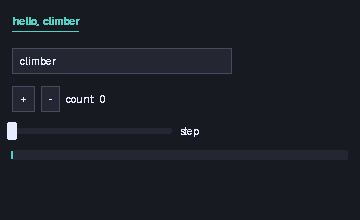
The model#
Widgets are function calls made every frame. ui.button("+") draws a button and returns whether it was clicked this frame; ui.slider("step", &mut step, 1.0, 10.0) draws a slider, writes the new value through the pointer, and returns whether it changed. There is no widget tree to build, no callbacks, no event handlers: the application's state is the application's own variables, and the frame loop reads and writes them.
    while ui.begin_frame() {
        ...
        ui.end_frame()
    }
begin_frame pumps the window's events, resets the layout and clears the canvas, and returns false once the window is closed; end_frame presents the frame. Between the two, the widgets go top to bottom, same_line() puts the next one to the right of the last, space(px) and separator() are the layout.
This suits a language with explicit ownership well: nothing outlives the frame, so nothing is shared, so there is nothing to reference-count or lock. It is the model of egui and Dear ImGui.
Headless#
var ui = nexium_gui.Ui.headless(360, 220)Ui.headless(w, h) is a Ui with a canvas and no window. The program draws one frame into it and saves the canvas with save_ppm, which is how this page has a picture and how the test suite checks the GUI without a display: nx test gui/nexium_gui.nx runs the toolkit's own tests headless, and the harness renders this counter's frame on every run.
Ui.open(title, w, h) returns null on a platform with no backend; the program above falls back to a message. The Win32 backend is in gui/ today; X11, Wayland and Cocoa are on the roadmap (1.8, with nexium-gui grown up).
What is there#
Widgets: label, dim_label, heading, button, checkbox, slider, text_input, progress, separator, space, panel. Free drawing on ui.canvas: fill_rect, rect, fill_rounded, hline, vline, text, set/get a pixel, with colours as 0x00RRGGBB and helpers rgb, mix, hue_color. Two themes, dark_theme() and light_theme(), and the ui.theme you can edit. The whole of gui/nexium_gui.nx is under a thousand lines and every part of it is ordinary Nexium, which makes it the best next thing to read if you want to write a widget.
The import nexium_gui line finds gui/nexium_gui.nx next to gui/counter.nx; a program elsewhere would use it as a path dependency (chapter 19). artifact link { c_sources = ["platform.c"] } inside the toolkit is what compiles the window layer in, and it says what to link per platform (libs_windows = ["user32", "gdi32"]).
Next: packages.
Exercises#
The compiler grades these: nx topo 18 writes them into a directory, nx topo check runs them. Or do them here: the code is editable, Run runs it with the compiler in the page (it loads on the first run and never sends your code anywhere), Check grades it as nx topo check would, and Reset puts the exercise back. Ctrl+Enter runs.
fill_rectfill in the blank
A canvas is one list of pixels, row after row. Replace ??? with the index of the pixel at
column x + i, row y + j, so fill_rect paints the rectangle the picture shows.
struct Canvas {
    w: usize
    h: usize
    px: List(u8)
}

impl Canvas {
    fn new(w: usize, h: usize) -> Canvas {
        var px = List(u8).new()
        for _ in 0..w * h { px.append('.') }
        return Canvas{ .w = w, .h = h, .px = px }
    }

    fn fill_rect(self: *mut Self, x: usize, y: usize, w: usize, h: usize, c: u8) {
        for j in 0..h {
            for i in 0..w { self.px[???] = c }
        }
    }

    fn show(self: *Self) {
        for r in 0..self.h { println("{}", .{self.px[r * self.w..(r + 1) * self.w]}) }
    }
}

fn main() {
    var canvas = Canvas.new(12, 5)
    canvas.fill_rect(1, 1, 4, 3, '#')
    canvas.fill_rect(7, 0, 3, 2, '+')
    canvas.show()
}
The recorded output
.......+++..
.####..+++..
.####.......
.####.......
............
Hints
- every row before row
rholdsself.wpixels, so rowrstarts atr * self.w
Solution
struct Canvas {
    w: usize
    h: usize
    px: List(u8)
}

impl Canvas {
    fn new(w: usize, h: usize) -> Canvas {
        var px = List(u8).new()
        for _ in 0..w * h { px.append('.') }
        return Canvas{ .w = w, .h = h, .px = px }
    }

    fn fill_rect(self: *mut Self, x: usize, y: usize, w: usize, h: usize, c: u8) {
        for j in 0..h {
            for i in 0..w { self.px[(y + j) * self.w + x + i] = c }
        }
    }

    fn show(self: *Self) {
        for r in 0..self.h { println("{}", .{self.px[r * self.w..(r + 1) * self.w]}) }
    }
}

fn main() {
    var canvas = Canvas.new(12, 5)
    canvas.fill_rect(1, 1, 4, 3, '#')
    canvas.fill_rect(7, 0, 3, 2, '+')
    canvas.show()
}predict_framespredict the output
Write what this prints into predict_frames.guess before you run it.
struct Ui {
    frame: u32
}

impl Ui {
    /// The mouse, scripted: `+` is clicked in frame 1, `reset` in frame 3.
    fn clicked(self: *Self, label: []u8) -> bool {
        return (self.frame == 1 and label == "+") or (self.frame == 3 and label == "reset")
    }

    fn button(self: *Self, label: []u8) -> bool {
        print("[{}] ", .{label})
        return self.clicked(label)
    }
}

fn main() {
    var ui = Ui{ .frame = 0 }
    var count: u32 = 0
    while ui.frame < 5 {
        if ui.button("+") { count += 1 }
        if count > 0 and ui.button("reset") { count = 0 }
        println("frame {}: {}", .{ui.frame, count})
        ui.frame += 1
    }
}
What does it print?
[+] frame 0: 0
[+] [reset] frame 1: 1
[+] [reset] frame 2: 1
[+] [reset] frame 3: 0
[+] frame 4: 0
Hints
buttondraws and answers in the same call: it is true only in the frame its click lands in- a widget exists in a frame only if the code calls it in that frame